

Is Google Flow free?
Image and video creative workspace with 50 daily credits for eligible Google accounts.
Current free offer summary
The current public landing page lists free-of-charge access without a Google AI subscription, and credits help confirms 50 daily Flow credits with or without a subscription. Refresh is triggered by the first generation; unused daily credits do not roll over. The model page names Nano Banana 2 Lite as a default available at no charge, while other help names Pro. Check the actual selected model and cost; not all models or operations are promised free. Getting-started help still lists a conflicting subscription requirement, so confirm account eligibility.
Google Flow image examples
Artwork featured on Google Flow's official site. Select an image to view it full size.
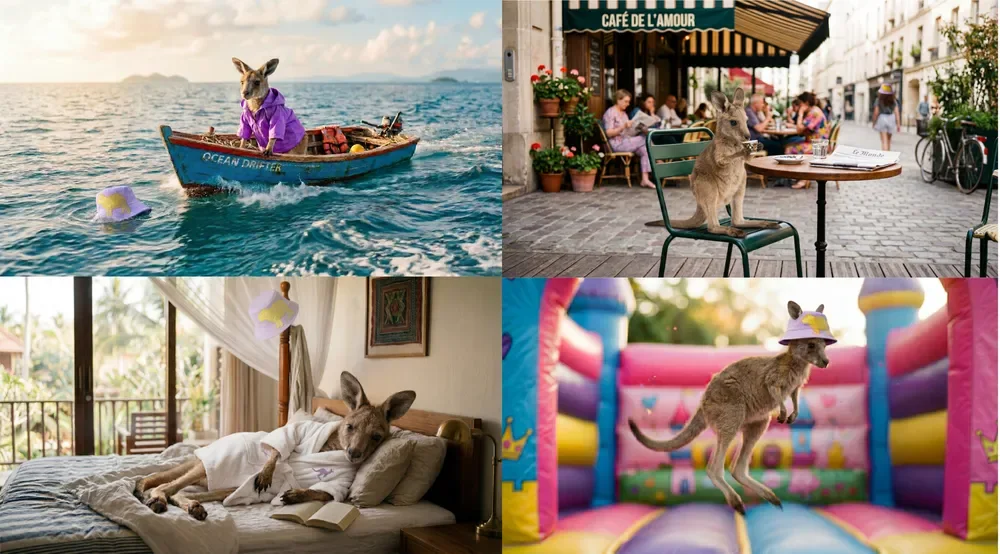
A character across scenes in Flow
Google labels this as subject preservation in Flow. Compare the character across settings, and watch for unintended changes when planning your own sequence.
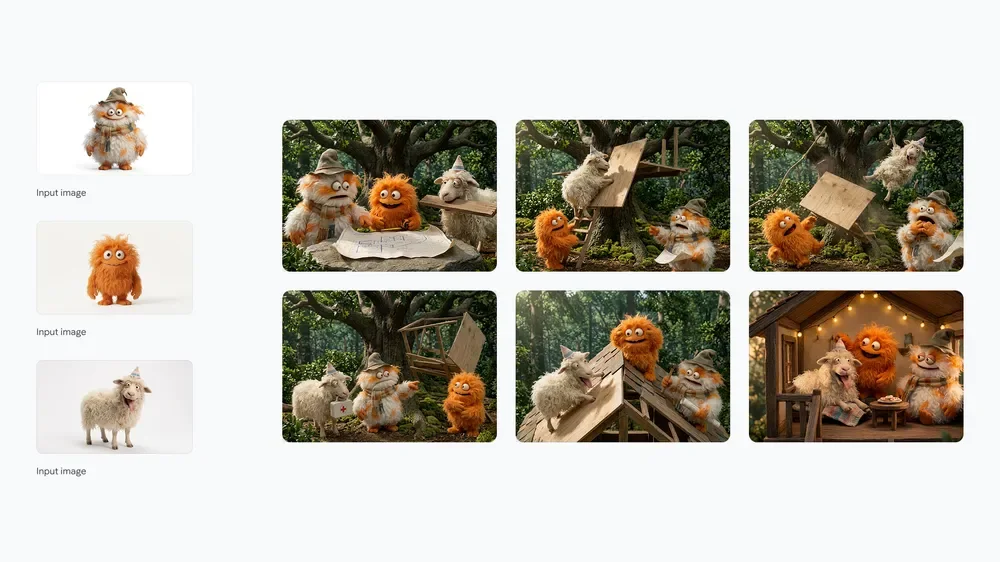
Model preview: a visual story
References and a sequence make the story easy to follow. This is a Nano Banana 2 model showcase; the source does not establish that this particular image was made in Flow.
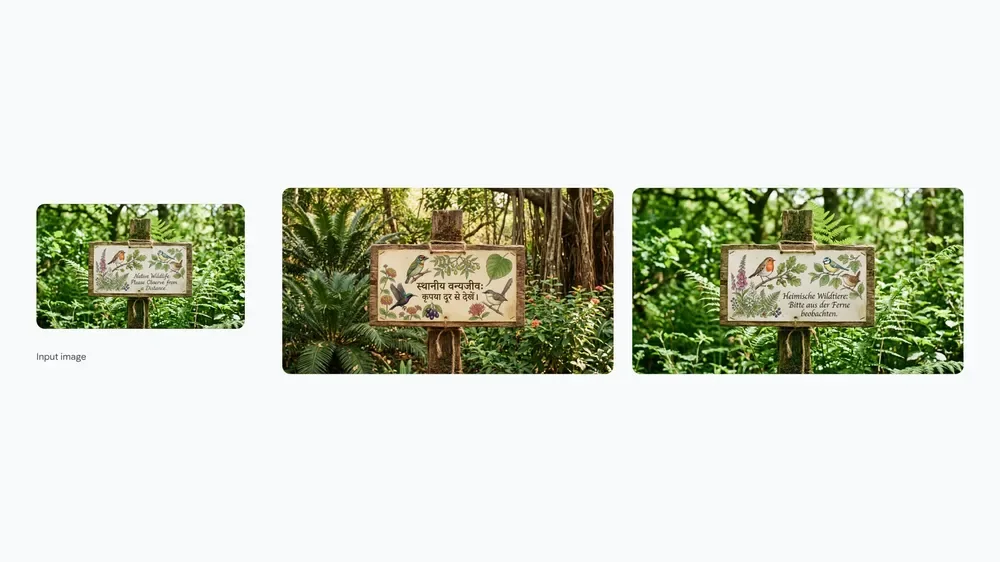
Model preview: localized lettering
The layouts keep the sign’s purpose recognizable while changing its language. Proofread generated text with someone who knows the language; a polished preview is not evidence that your wording will be correct.
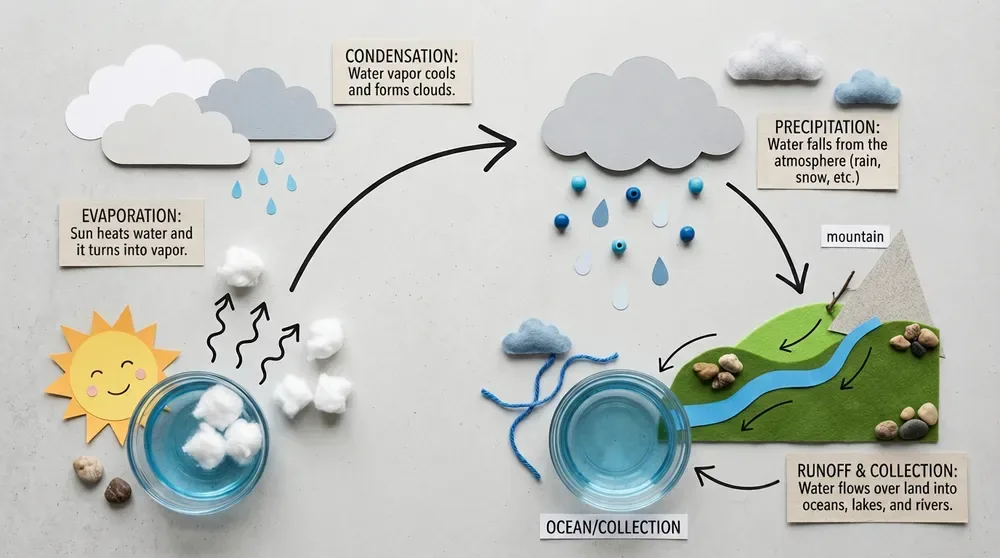
Model preview: a tactile learning diagram
Objects make an abstract process easier to follow. Verify every label and scientific relationship before teaching from generated diagrams; this model preview is not established as a Flow Free-account result.
Provider artwork source · Source checked
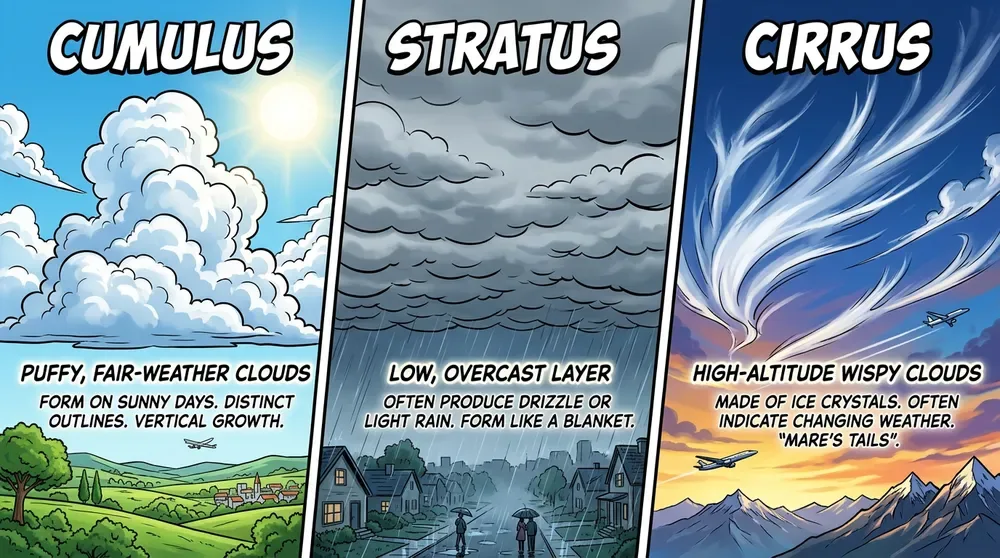
Model preview: compare three cloud types
Panels make the comparison easy to scan. Check the labels and descriptions against a reliable reference rather than assuming polished generated text is accurate.
Provider artwork source · Source checked
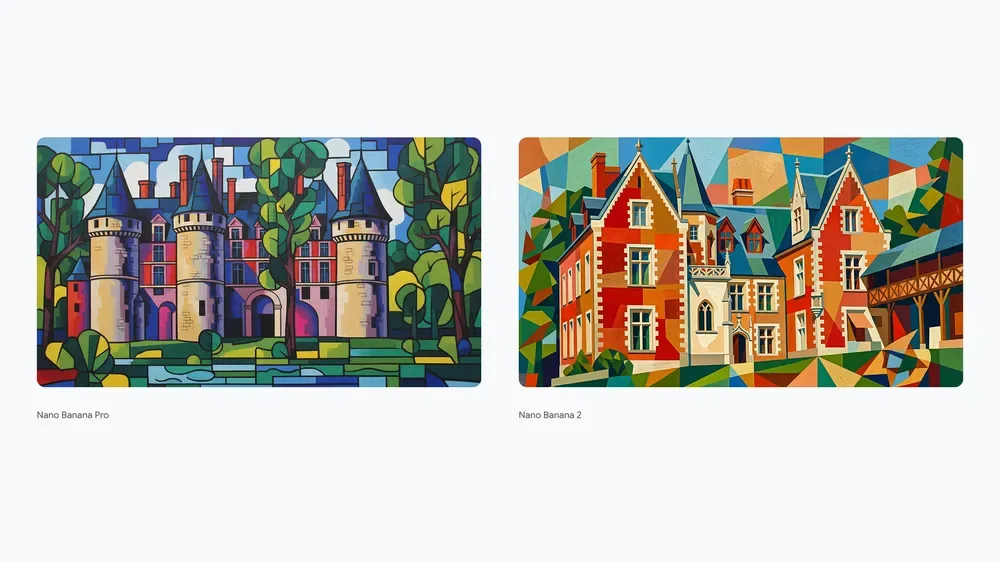
Model preview: two architectural interpretations
Geometric color blocks reinterpret a recognizable building. Google labels the subject Museum Clos Lucé; these model-showcase views do not establish a particular Flow plan, generation cost or export quality.
Provider artwork source · Source checked
Source: Google Flow's official artwork previews. Google’s Nano Banana 2 announcement identifies the kangaroo sequence as a Flow example. The treehouse, localized signs, learning diagrams and architectural board illustrate the model’s capabilities; their use inside Flow is not established. These are provider previews, not our test results or verified Nano Banana 2 Lite outputs. No creation cost or export quality is established by this gallery.
Try the reading-nook exerciseGoogle Flow video examples
Three original FreeAIList tests made with daily Google Flow credits on October 8, 2026. All use Omni 1.1 Flash, 720p, six seconds and one output for ten credits each. These are silent web previews of our downloaded clips; the originals retain generated audio. No watermark was cropped or removed. Higher-resolution downloads were upgrade-gated in the tested account. Usage rights and access can change; these tests establish this recorded route only.
Official free-plan availability ↗Our test · Omni 1.1 Flash · Silent preview
The driftwood tide clock
A pearl follows a brass spiral and drops into a tidal pool, leaving expanding ripples. The main action follows the brief; the model added clock-face markings despite the no-writing instruction. No visible mark was found in our sampled frames; invisible provenance is not assessed.
Generated 2026-10-08 · Text to video · 16:9 · 720p · 6 seconds · 1 output · 10 credits
Exact prompt and access record
A miniature brass tide clock stands on a crescent of driftwood in a still black tidal pool at blue hour. A single luminous pearl rolls slowly along its spiral track and drops into the water, making one expanding ring of ripples. Macro cinematography, copper and deep teal, fixed camera, realistic materials, one continuous shot, no people, no writing, no logos, no music or dialogue.
Generated from an existing account's 50-credit daily Flow balance, with no purchase or upgrade. Each request showed ten credits; the balance fell from 50 to 20 after three single-output requests. This is one account test, not a universal model entitlement or account grant.
Our test · Omni 1.1 Flash · Silent preview
The glass-moth lantern
A glass moth opens its wings and glows amber against greenhouse ferns. The lighting change is clear, but framing moves closer despite the locked-camera request. Transparent wings and foliage are useful details to compare across frames.
Generated 2026-10-08 · Text to video · 16:9 · 720p · 6 seconds · 1 output · 10 credits
Exact prompt and access record
A tiny lantern shaped like a translucent glass moth hangs from a branch inside a moonlit greenhouse. The moth slowly opens its glass wings once, revealing warm amber light that spills across dew-covered fern leaves. Locked medium close-up, delicate refractions, cool violet shadows, one continuous shot, no people, no text, no logos, no music or dialogue.
Generated from an existing account's 50-credit daily Flow balance, with no purchase or upgrade. Each request showed ten credits; the balance fell from 50 to 20 after three single-output requests. This is one account test, not a universal model entitlement or account grant.
Our test · Omni 1.1 Flash · Silent preview
The paper-city jellyfish
The camera tilts toward a glowing paper lantern above a map-covered city while long ribbons curl below it. The model chose weathered paper and prominent street-map markings; the result is more textured than a clean origami scene.
Generated 2026-10-08 · Text to video · 16:9 · 720p · 6 seconds · 1 output · 10 credits
Exact prompt and access record
A single handmade paper jellyfish lantern floats above a miniature rain-soaked city built from folded maps. Its long paper ribbons curl gently as it rises past one rooftop; warm light shines through the paper and reflects in a puddle. Low-angle close-up, layered paper fibers, midnight blue and golden amber, slow upward camera tilt, one continuous shot, no people, no readable text, no logos, no music or dialogue.
Generated from an existing account's 50-credit daily Flow balance, with no purchase or upgrade. Each request showed ten credits; the balance fell from 50 to 20 after three single-output requests. This is one account test, not a universal model entitlement or account grant.
These previews start only when you press Play. Their scene descriptions and exact prompts remain readable without playing. The tests do not establish a universal watermark-free or commercial-use policy.
Silent copies preserve the original video frames; generated audio was omitted from these web previews. Original downloaded files were retained for the owner.
Read the video generation stepsWhat Google Flow does
Google Flow combines image generation, image editing and short-video creation in a project workspace. Its current landing page and credits help describe free non-subscriber access with 50 daily credits. Start with a still image, review the selected model and cost, then optionally use it as a starting frame for a clip. Age, account and region requirements apply; getting-started help still includes a conflicting subscription requirement.
- Text-to-image
- Image editing
- Text-to-video
- Frames-to-video
- Reference-based video
- Video editing
- Project asset management
Best for
- ✓ Drafting a still image before spending video credits
- ✓ Animating a selected starting frame
- ✓ Organizing personal image and short-video experiments
Important limits
- • Requires an eligible Google account, age 18+ and a supported region
- • Current landing and credits pages describe non-subscriber access; getting-started help still lists subscriptions
- • Image-model default wording conflicts across help pages; check the selector and cost
- • No-charge models have rate limits and video access can pause for non-subscribers at peak times
- • Costs are per generation; multiple outputs can multiply the charge
- • Unused daily credits do not roll over; paid monthly balances have separate renewal rules
- • All documented Veo, Omni and Nano Banana outputs include invisible SynthID; visible marks vary by settings and region
- • Commercial use of your original generated outputs is allowed subject to Google terms, content policies and third-party rights; this is not a copyright or platform monetization guarantee
- • Anyone with a share link can find and use the creation; include inputs is optional
- • Universal card requirements and a Flow-specific API entitlement remain unknown
FreeAIList verdict
Useful for a personal image-first scene experiment that may become a short video. At the checked rate, an untouched 50-credit balance fits five 6-second Omni Flash 720p generations, provided that option is available; this is a budget calculation, not measured output. Review one still before animating, reserve retries and check actual model/access settings. Choose a layout editor when editable text and a finished poster are the main goal.
Paid plans: Optional Google AI plans add monthly credits and features alongside the daily allowance. The landing page lists Plus with 200 extra monthly credits and Pro with 1,000; prices vary by market. Current credits help lists a 6-second Omni Flash 720p generation at 10 credits for all users, per generation rather than request. Recheck settings before generating.
About this practical guide
Sources checked Oct 3, 2026
The documentation-based walkthrough was checked on October 3, 2026; its reading-nook practice prompt remains untested. Separately, on October 8 we generated and downloaded three different text-to-video scenes with Omni 1.1 Flash at 720p, six seconds and one output. Each request displayed ten credits and the daily balance fell from 50 to 20, with no purchase or upgrade. The video gallery records those exact prompts and qualified observations; the account test does not establish universal model entitlement, generation speed or commercial rights.
Compare free image tools →How to start with an image in Google Flow
Start with a still image you can review before spending video credits. Use an original subject for a personal experiment, with no client references or confidential uploads. Google’s public landing page and credit guide both describe free access; an older-looking subscription requirement remains in its getting-started help. If your account cannot enter, check eligibility rather than treating a paid upgrade as a guaranteed fix.
Check eligibility and create a project
Open Google Flow, sign in with a Google account and check the age and region requirements. Choose + New project and give it a useful name, such as Rainy reading nook. Desktop Chromium is the documented browser recommendation.
Choose Image explicitly
Use the standard prompt box, click the model name and select Image. Check the model, shape and number of outputs. Google’s model page names Nano Banana 2 Lite as a default available at no charge, while other help text names Pro. Read your actual selector instead of relying on either default.
Keep the first draft small
Use one available output and a landscape shape for the exercise below. Check settings for the current cost before confirming; a no-charge image model can still have rate limits. Avoid asking the Agent for a large set of variations before learning the controls.
Generate and compare with the brief
Describe the subject, framing, lighting and style, then select Generate Image. Check furniture, reflections and unwanted writing. Keep the draft that best meets the purpose; more detail does not automatically make a better background.
Refine one area
Open the image and use an available selection or drawing control to identify the part you want changed. Give one focused edit instruction. History retains earlier versions, so compare the change before using it as your next reference.
Example: a reading-nook background, then one quiet shot
Make a background for a personal reading video. Put the main object on one side so you can add a title in your editor. The still image is a complete first goal; animation is optional. This brief is original practice material, not a reproduction of the provider gallery.
Example prompt to try
Wide cinematic still of a small reading nook beside a rain-covered window, one warm desk lamp and one closed blue book on a wooden table, empty chair on the left, quiet uncluttered space on the right for a title, soft amber light against cool evening blue, no people, no lettering, no logos
- Does the image leave readable space for a title? Add real titles in an editor so you can control spelling and contrast.
- Is there exactly one book and one lamp, with believable reflections and straight furniture? Fix the most distracting error before animating it.
- For animation, try: ‘Keep the book and lamp still; show rain sliding down the window and a very slow camera push toward the table.’ One clear action is easier to judge than a list of simultaneous changes.
- Compare the first and last frames for changing objects or lighting. Watch the whole clip, including its audio, before using it as a background.
- Keep the useful still as a fallback if video access or the daily balance stops you. Save the prompt and settings alongside the downloaded result.
How to turn your chosen image into a short clip
Use the image as a starting frame when you want the shot to begin with that composition. A reference ingredient guides a scene; it is a different control from setting its first frame. Not every model or feature is available to every account or region.
Select Video and Frames
In the prompt box, click the model name, choose Video and then Frames. Drag the selected image into + Add start frame. An end frame is optional; leave it out for this simple motion exercise.
Set a deliberate budget
Choose an available model, duration, shape and one output. Review the displayed cost after any change. The checked credit table lists a 6-second Omni Flash 720p generation at 10 credits; confirm that option and price in your account before using the example budget.
Describe motion, generate and inspect
Give the motion instruction from the exercise, then select Generate. Watch for drifting shapes and unwanted movement before retrying. If non-subscriber video access is paused at peak times, keep working on the still or try later.
How far do 50 daily credits go?
Divide your balance by the cost of the specific operation. At the checked 10-credit rate, an untouched 50-credit balance fits five 6-second Omni Flash 720p generations. Planning one draft and one retry would reserve 20 and leave 30. These are arithmetic examples, not observed account results or a guaranteed daily video count.
Costs apply per generation, not per request. Two outputs at that example rate use 20 credits together. Editing, other models and longer clips can cost differently; review settings each time. A no-charge image option does not mean every image model, upscale or video operation is free.
Daily refresh is triggered by the first generation and unused daily credits do not carry over. Subscriber monthly credits renew on the billing cycle, which is a separate rule. Google also documents rate limits for zero-credit models and possible peak-time restrictions for non-subscriber video generation; no exact wait or universal peak window is promised here.
Current daily allowance and per-generation credit table ↗Check rights and choose the workflow you need
For commercial work, Google’s Flow FAQ refers you to the full terms and says Google does not claim ownership of original content. That statement does not clear someone else’s logos, likeness, music or reference assets. Commercial permission remains Unknown in this listing; review the applicable terms and materials before accepting a client brief.
Flow is a browser creative workspace. Using the same model family through a developer API involves separate setup and billing; the 50 daily Flow credits do not establish an API free tier. Choose Flow for hands-on scene drafting, and check developer pricing separately if your application must generate content programmatically.
Google’s Flow eligibility, output marks and commercial-use FAQ ↗When to choose Canva Magic Media instead
Consider Canva when your main goal is finishing a poster or presentation with editable text around a generated image. Its design editor is useful when the final layout matters more than making a moving scene.
Canva has its own shared AI allowance and premium-element export rules. Flow’s daily credits do not transfer, and neither allowance guarantees a polished result. Check the finished export before choosing a paid option.
Official sources
These links support the important free-offer claims on this page.
- Google Flow commercial-use FAQ and access qualifications ↗
Commercial-use FAQ refers to full Google terms and original generated content ownership. It does not state a Free-only noncommercial restriction. Read with terms and Labs policies, this supports qualified commercial output use. Existing subscription/access conflict and SynthID qualifications remain; no new free entitlement is inferred.
- Google terms: generated content, business use and third-party rights ↗
Reviewed English US terms effective July 30, 2026 permit service use subject to applicable terms, address business users and do not claim ownership of original generated content. Users must respect law, policies and third-party rights. Commercial classification is based on combined Flow FAQ/terms/policies; this is no guarantee of copyright, exclusivity or platform monetization. Country-specific terms apply.
- Google Labs service-specific policy registry ↗
Labs.google entry lists Google general terms and Generative AI Prohibited Use Policy. No Free-only noncommercial condition appears in the checked registry entry; Flow FAQ and full listed policies provide the combined basis for qualified commercial use.
- Google Generative AI Prohibited Use Policy ↗
Policy requires lawful use and respect for third-party privacy and intellectual property; harmful, abusive and deceptive uses are restricted. It contains no general noncommercial-only condition in the checked text. This does not clear rights to third-party inputs, music, demos or people.
- Google Flow video, frames and reference workflows ↗
Standard prompt box selects Video, aspect ratio, output count, model and duration. Frames accepts a start frame and optional end frame; prompt describes motion. Ingredients are reference media, a separate control; feature availability can differ by region.
- Google Flow projects, downloads and sharing ↗
New project creates a workspace; More then Download project archives it. Video tile More then Download offers available file types. Anyone with a share link can find and use the creation; inputs can be included optionally, and stopping sharing requires deleting the original creation.
- Google Flow image selection, generation and history ↗
The standard prompt box selects Image, ratio, outputs and model before generation; selection and drawing controls support edits and History retains prior versions. Its Nano Banana Pro default wording differs from the model help no-charge Lite default; inspect actual selected model.
- Google Nano Banana 2 model previews including Flow sequence ↗
February announcement labels kangaroo subject-preservation sequence as made in Flow; treehouse and localized sign previews illustrate the model, without establishing those particular assets were made in Flow. Previews do not prove current Lite costs, export behavior or FreeAIList test results.
- Google Flow supported regions ↗
Official supported-region list includes the Philippines. Region eligibility and per-feature availability must be checked rather than assuming worldwide access.
- Google Flow daily refresh and per-generation costs ↗
With or without subscription, 50 daily credits; first generation triggers refresh and unused daily credits do not roll over. Costs apply per generation, not request. Omni Flash 720p 6-second generation costs 10 for all users at checked table; confirm current settings and availability. Peak-time non-subscriber video restrictions can apply; exact windows differ across platform help variants.
- Google Flow image-model families and availability ↗
Lists Nano Banana Pro, Nano Banana 2 and Nano Banana 2 Lite; Lite is a default available at no charge and Pro is default for Ultra. Model and feature availability vary; this does not establish all-model zero-cost access or an API entitlement.
- Google Flow live free-access landing and plan comparison ↗
Live public landing viewed without sign-in explicitly lists Free of Charge without a Google AI Subscription, 50 daily credits and Google-account access. Prices vary by market; features vary by tier, platform and region. Confirms non-subscriber route independently of credits help, despite conflicting getting-started wording.